Meet.
Share.
 Stay in touch.
Your digital business card, on your wrist.
Share your professional profile and contact details through NFC or QR. Join the QANTRA waitlist for product and availability updates.
See what opens after a tap
A clean, professional profile designed for instant contact saving.
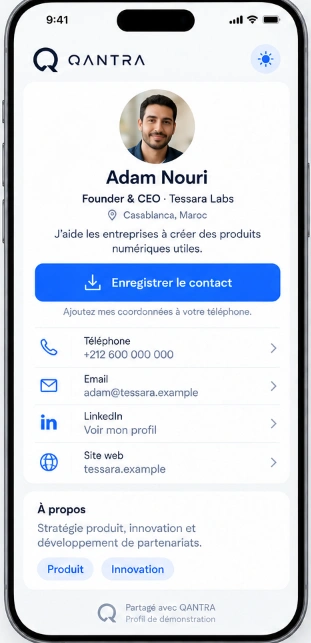
Verified Identity & Role
Present your name, photo, title, company, and bio with a crisp, executive presentation.
One-Tap Contact Saving
The prominent "Save Contact" action creates a clean .vcf contact card directly in the recipient's phone.
Direct Communication Channels
Instant phone dialing, email drafting, LinkedIn connection, and company website exploration.
No App Required for Viewers
The people you meet do not need any special software or account. It opens instantly in Safari, Chrome, and all browsers.
How sharing happens
Three natural steps from introduction to permanent contact.
1. Tap or Scan
Hold the bracelet near an NFC-enabled smartphone, or let them scan your backup QR code.
2. Profile Opens Instantly
The profile loads directly in Safari, Chrome, or any mobile browser with zero app installation.
3. Save to Contacts
The recipient taps "Save Contact" to add your standardized vCard directly to their phone's address book.
Be first in line for the QANTRA wristband
Early availability updates, private previews, and launch announcements.
Designed for the real world
Every feature is engineered to make professional networking faster and more reliable.
Frictionless Sharing
Works across iOS and Android without requiring the recipient to download an application or sign up for an account.
Always Up to Date
Changed roles, phone numbers, or social links? Update your profile anytime from your browser without reprinting cards.
Dual NFC & QR Technology
Instant background NFC tap for modern phones, paired with a high-contrast QR code for older devices or crowded venues.
For you. For your team.
Choose the experience tailored to your networking scale.
For Individuals
For founders, executives, independent professionals, and active networkers who want a permanent, elegant digital card on their wrist.
Join for Myself →For Teams & Companies
Equip your sales team, representatives, or conference delegation with unified branding, consistent contact cards, and coordinated deployment.
Frequently Asked Questions
Straightforward answers about QANTRA Personal & Teams.
Do people need an app to view my profile?
No. Anyone who taps your wristband or scans your QR code sees your profile directly in their phone's native web browser (Safari, Chrome, etc.). No app installation or account creation is required.
How does contact saving work?
When someone views your profile, they can tap "Save Contact". Their phone prompts them to add your details (name, phone, email, company, and links) directly into their address book via standard contact file (.vcf).
What phones are compatible with NFC?
Virtually all modern smartphones (iPhone XS and newer, and most Android devices produced in the last 6+ years) support background NFC reading. For devices without NFC, a QR code provides an instant fallback.
Can I update my details after receiving the wristband?
Yes. Your wristband links to your live web profile. You can edit your contact details, photo, links, and bio anytime, and the next tap will display your updated information.
How can I equip my team or company?
Select "For my team" in the waitlist form above or below. We will reach out with team options, custom volume availability, and organizational details.
Ready to upgrade how you connect?
Join professionals and teams on the QANTRA waitlist today.